
 Growth with Flow

Orpi Saint-Georges gets back in touch with past clients on WhatsApp
Over ten years, the agency gathered nearly 3,000 contacts: buyers and sellers. Today it uses an app built for it, which writes to them on WhatsApp, listens to their plans and alerts the agent who knows them.
A client answers the WhatsApp campaign. Georges, the agency's assistant, carries on the conversation.
- The agency
- Orpi Saint-Georges, real estate agency
- The channel
- WhatsApp, from the agency's own number
- Used by
- All 16 people at the agency, each according to their role
- Built by
- Youssef, Growth with Flow, for the No-Code IA agency
3 buying or selling projects from the first campaign
Past clients to reach again, and no time to do it
Since the agency stopped cold prospecting, past clients have become its first source of new business. They bought or sold with the agency, they know it, and some of them have a new plan today.
But agents are out in the field, and reaching 3,000 people one by one isn't realistic. The contacts themselves were scattered: five files from three different tools, with duplicates, numbers to check and clients still assigned to agents who had left.
A WhatsApp marketing campaign, then Georges takes over
WhatsApp is where clients actually reply. The app writes from the agency's number; when a client answers, Georges, the agency's assistant, carries on the conversation and hands over to the agent as soon as a plan comes up.
- One databaseTen years of files cross-checked: one client, one record, with their original agent.
- A WhatsApp marketing campaignA message approved by Meta, sent segment by segment.
- Georges listensHe answers simple questions, one question at a time, in the agency's tone.
- The agent calls backAlerted on their phone, they find the plan and what the client said.
Every project lands with the right agent
The projects Georges spots are sorted by stage: to call back, in progress, meeting, won. The agent sees what the client wants, rereads the latest messages, calls them, then notes where things stand.
Four months, built with the team
- Kick-offA first segment picked with management: investors who bought three to eight years ago.
- The first messagesSent from the agency's number. The five files are merged into one database.
- The test campaignAbout a hundred past clients contacted, and the first projects passed on to agents.
- The version for the whole teamFive roles, one login each, an interface designed for the phone too.
The app, screen by screen
Eight screens, filmed in the real app on a demo database: the names, messages and figures shown are fictional.
Day to day. Every project lands with the right agent.
An agent only sees their own clients
Everyone's view. An agent only sees their own clients.
Each agent only finds the clients they're responsible for, their conversations and their projects: a few pages, designed for the phone. Management sees the whole agency, the campaigns and the settings. The app opens in the browser, nothing to install.
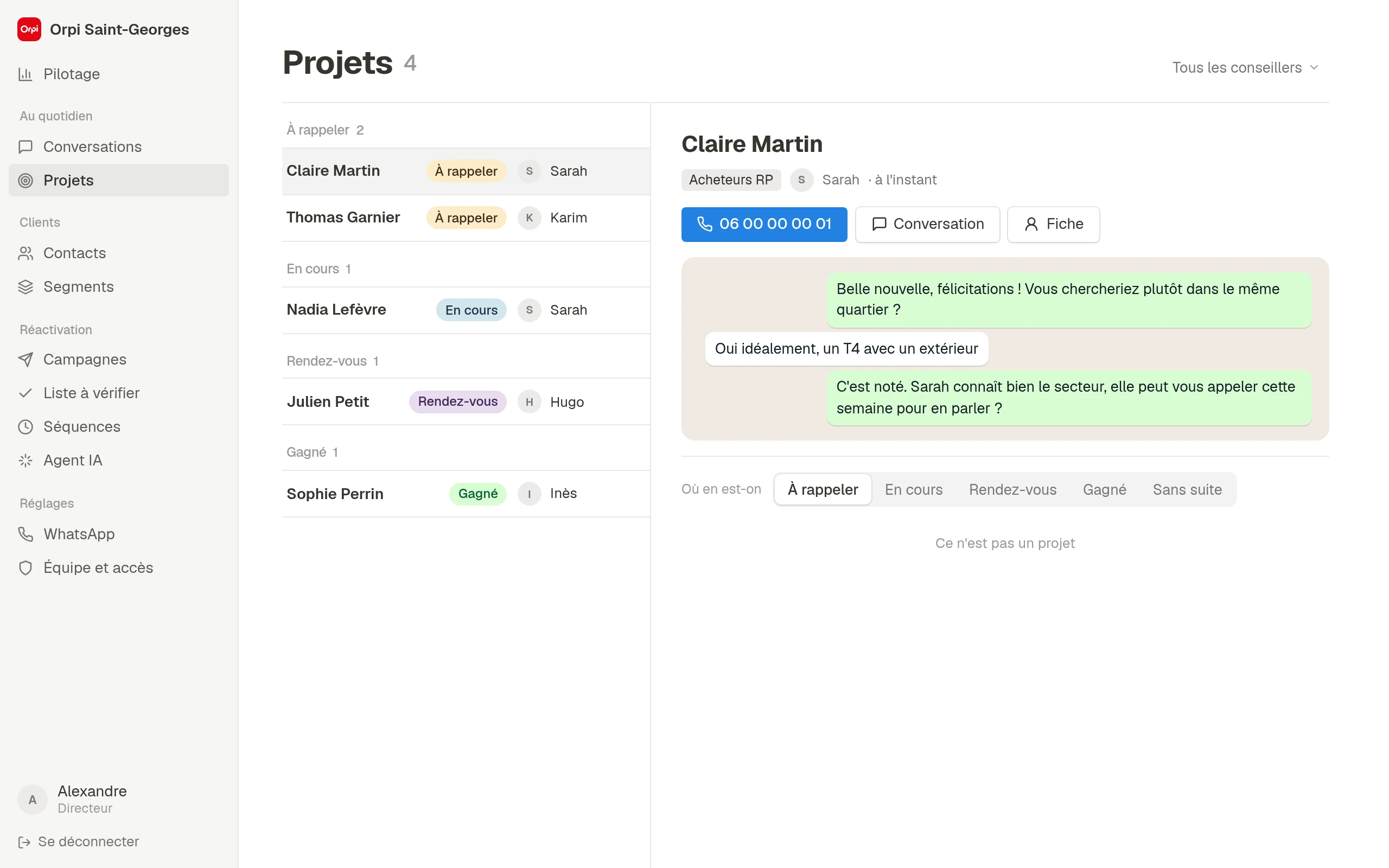
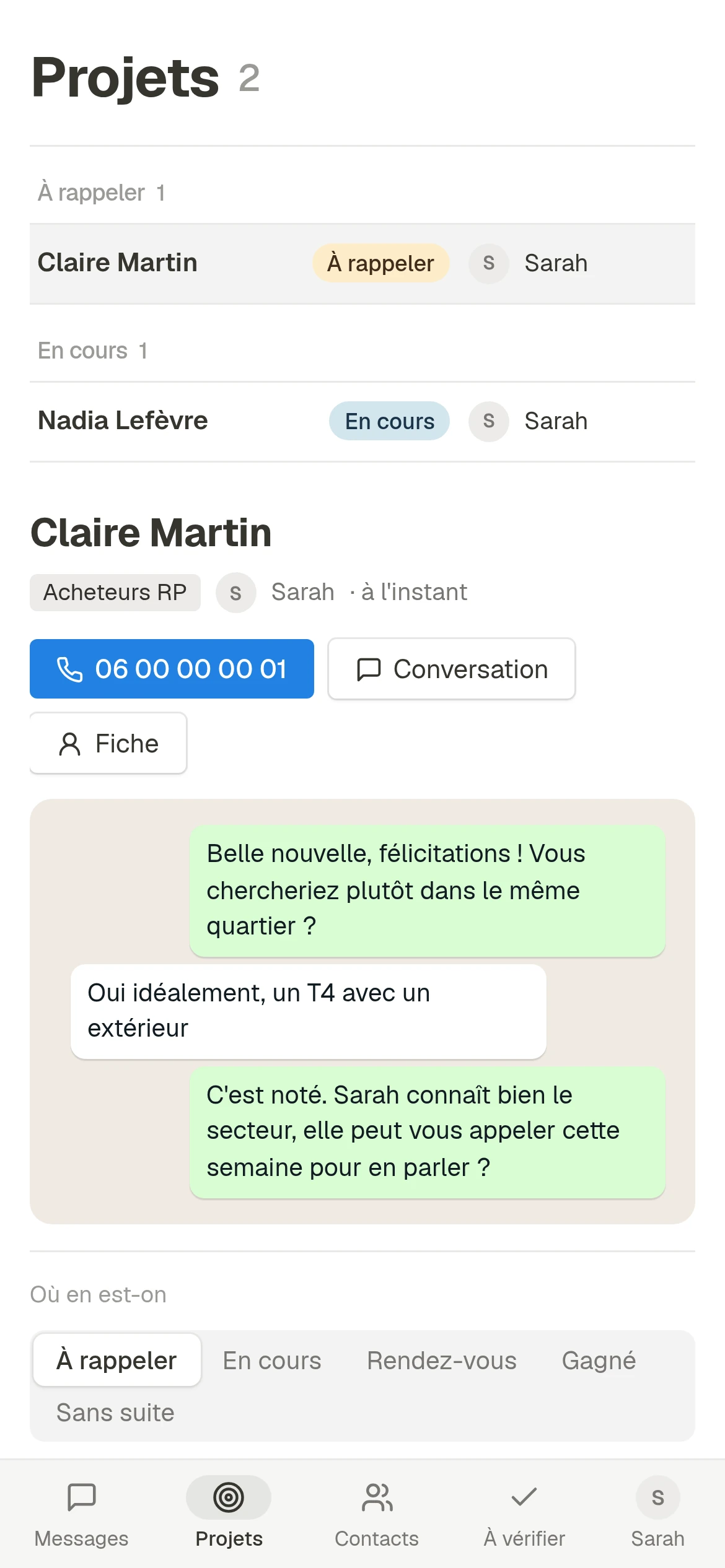
On the left, management: the whole agency's projects and the full menu. On the right, Sarah on her phone: only her two projects, and four tabs.
Ten years of files merged into one database
Contacts. Ten years of files merged into one database.
The contacts came from three tools: the current CRM, the old one, and hand-kept registers. The app cross-checks their 5,000 rows: each client exists once, with their original agent, their purchases and sales, and a trace of every file they came from.
- Duplicates merged
- File initials matched to the right agent
- CRM export dropped in as is, every month
A message that fits each story
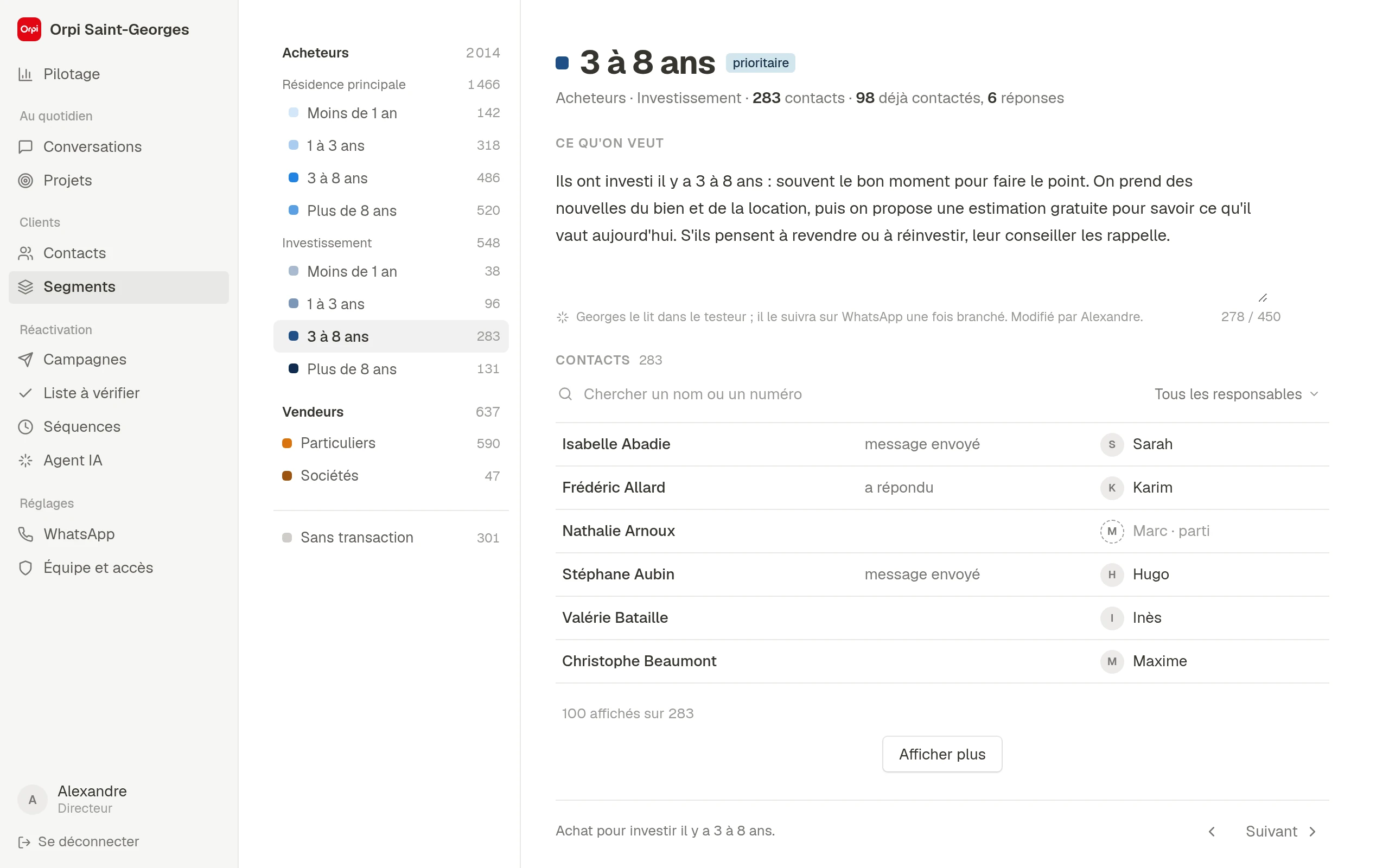
Segments. A message that fits each story.
An investor who bought five years ago and a family who sold last year don't expect the same message. Contacts are sorted into ten segments according to their history with the agency: purchase or sale, main home or investment, how long ago. For each one, the team writes what it wants in a few sentences, and Georges sticks to it.
An assistant you set up the way you brief a colleague
Georges. An assistant you set up the way you brief a colleague.
Georges relies on what the team gives him: the agency's reference sheets, rules written in plain language, a note on tone. Add a sentence, the tester replays the conversation, and you immediately see what Georges would answer.
- Introduces himself as the agency's AI assistant
- Never makes up a price or a timeline
- Hands over to the agent
Campaigns described in plain language
Campaigns. Campaigns described in plain language.
For each segment, you write what you want in a few sentences, pick a first message approved by Meta, and Georges follows those guidelines. A campaign goes through three steps, review, pace and date, approved launch: nothing goes out before that.
- Contacts grouped by agent
- Sends spread out at the chosen pace
Keeping in touch with every new client
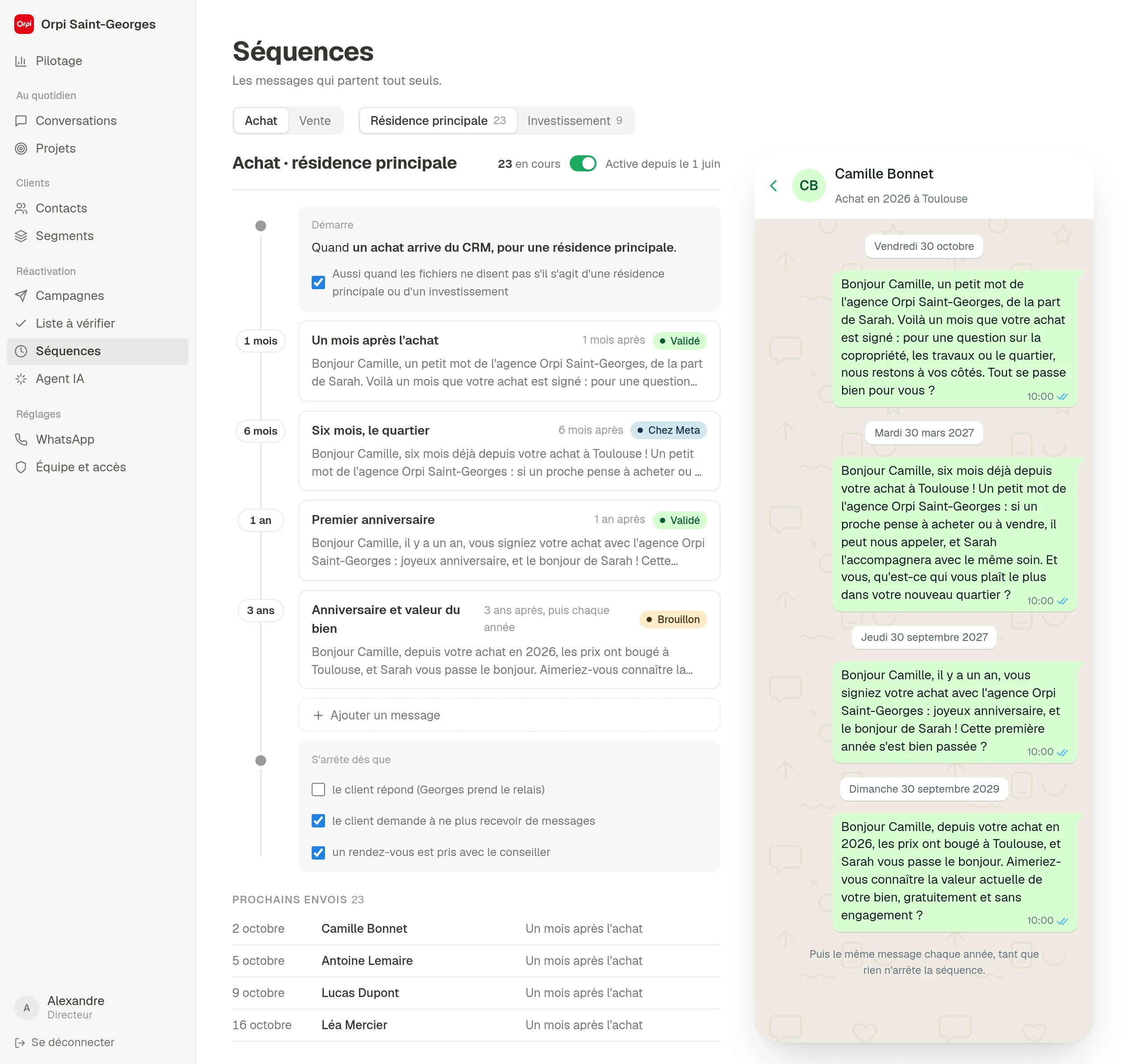
Sequences. Keeping in touch with every new client.
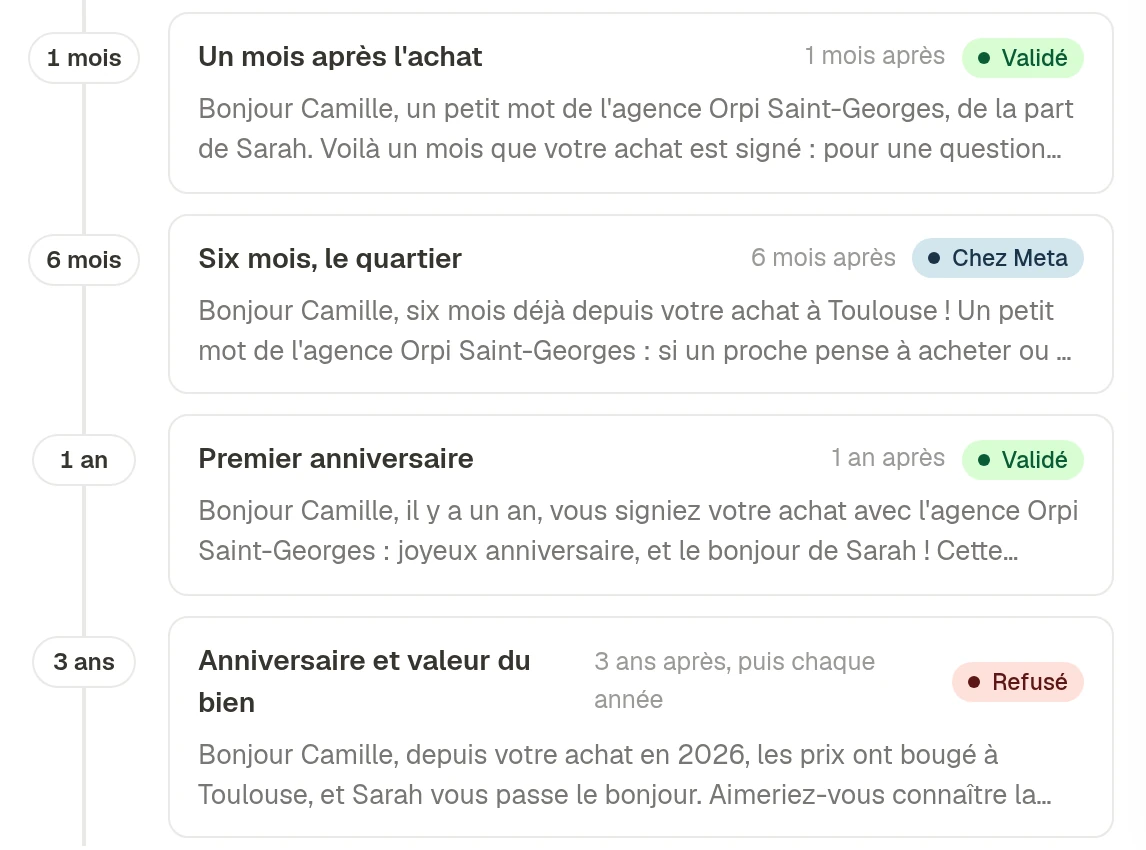
After a signing, the client enters a sequence of a few messages spread over the years, depending on their case: purchase or sale, main home or investment. The timeline is ready; automatic sending is the next step.
The agency's real number, verified by Meta
WhatsApp. The agency's real number, verified by Meta.
Messages go out from the agency's number, with its name and business profile. Each first message is a template submitted to Meta from the app, and only used once approved.
What matters, at a glance
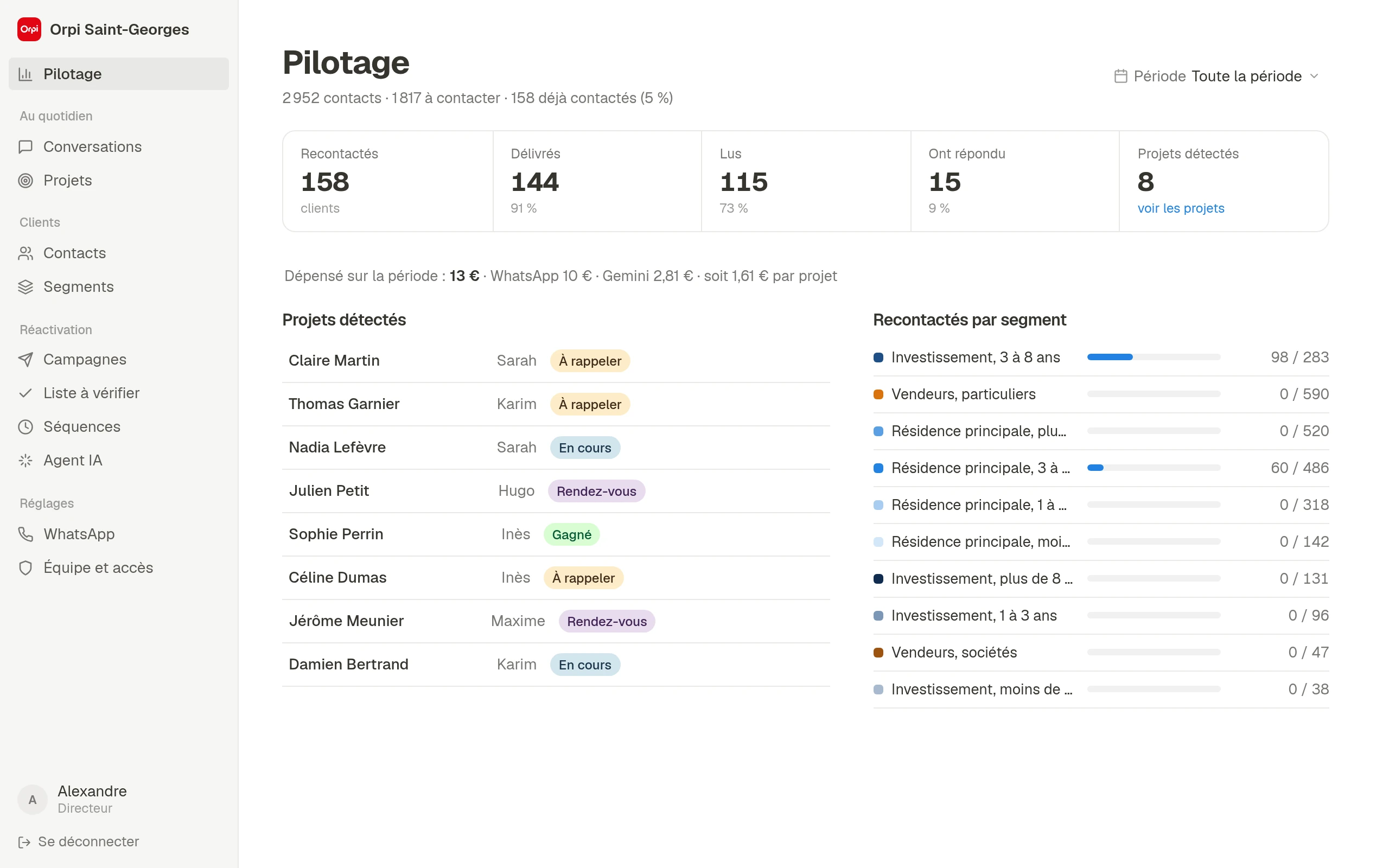
Dashboard. What matters, at a glance.
Management follows the database, campaign activity, projects in progress and the month's spend, AI and WhatsApp included.
An agent leaves. Their clients are handed to a colleague in one click, and their history follows.
Before every campaign. The team reviews the list, and only “I've checked” approves a contact.
Built around the team's requests
The app isn't off-the-shelf software adapted after the fact. Every screen was designed with management, the assistant and the agents, and many details come straight from their feedback.